 Written by
How the calculator works
The daily loss tool takes five inputs: the fixed monetary allowance, the start-of-session balance, closed net P/L, open net P/L and a separate overall floor. It outputs the daily floor, current equity, headroom and a reset comparison. Whether touching the limit or only falling strictly below it counts as a breach is a user choice, because programs differ on that boundary. The tool is not connected to an account, does not check execution restrictions and does not certify payout eligibility. For where this rule sits in the wider process, see how challenges work.
Fixed allowances and percentage conversion
Programs express the daily allowance either as a fixed dollar amount or as a percentage of a reference balance. A percentage only becomes money once the reference is fixed. As an original illustration, a 100,000 account with a 5% allowance has a 5,000 daily allowance, because 100,000 x 5% = 5,000. FTMO Global 2-Step defines Maximum Daily Loss as 5% of initial simulated capital, with the floor set at the 00:00 CE(S)T account balance minus that allowance (source: FTMO Trading Objectives). Apex's 50K EOD evaluation instead uses a fixed 1,000 daily loss limit (source: Apex EOD Evaluations).
Live equity includes open positions and costs
Daily equity is the figure a daily loss tool must measure correctly. FTMO defines it as account balance plus open profit and loss plus swap points, minus commission costs, never with positive commissions added back (FTMO, verified 4 October). Because net profit and loss inputs already include commission costs, subtracting them again would double count. In FTMO's 2-Step evaluation the daily loss limit is breached strictly below the floor, not at it. Other programmes may measure loss differently, so this formula applies to the selected daily-loss tool scope only.
When the allowance resets
The daily allowance resets on the program's clock, not the trader's local time. FTMO Global 2-Step resets at 00:00 CE(S)T (source: FTMO Trading Objectives). A floor computed at midnight is replaced by a new one at the next reset, and a different timezone can shift which trades fall inside which session. Check the reset timezone before assuming a session boundary.
Daily limit and overall floor run together
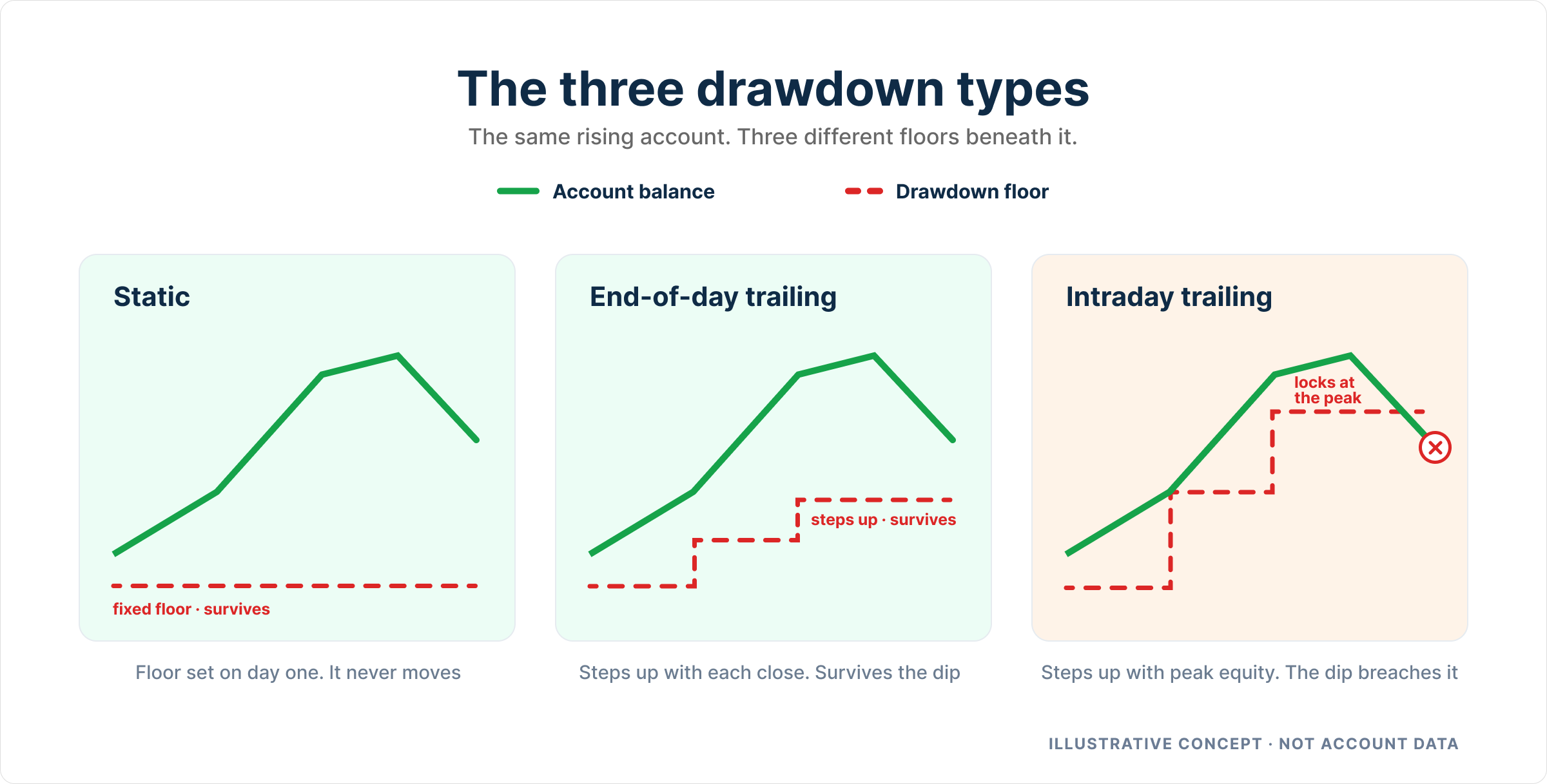
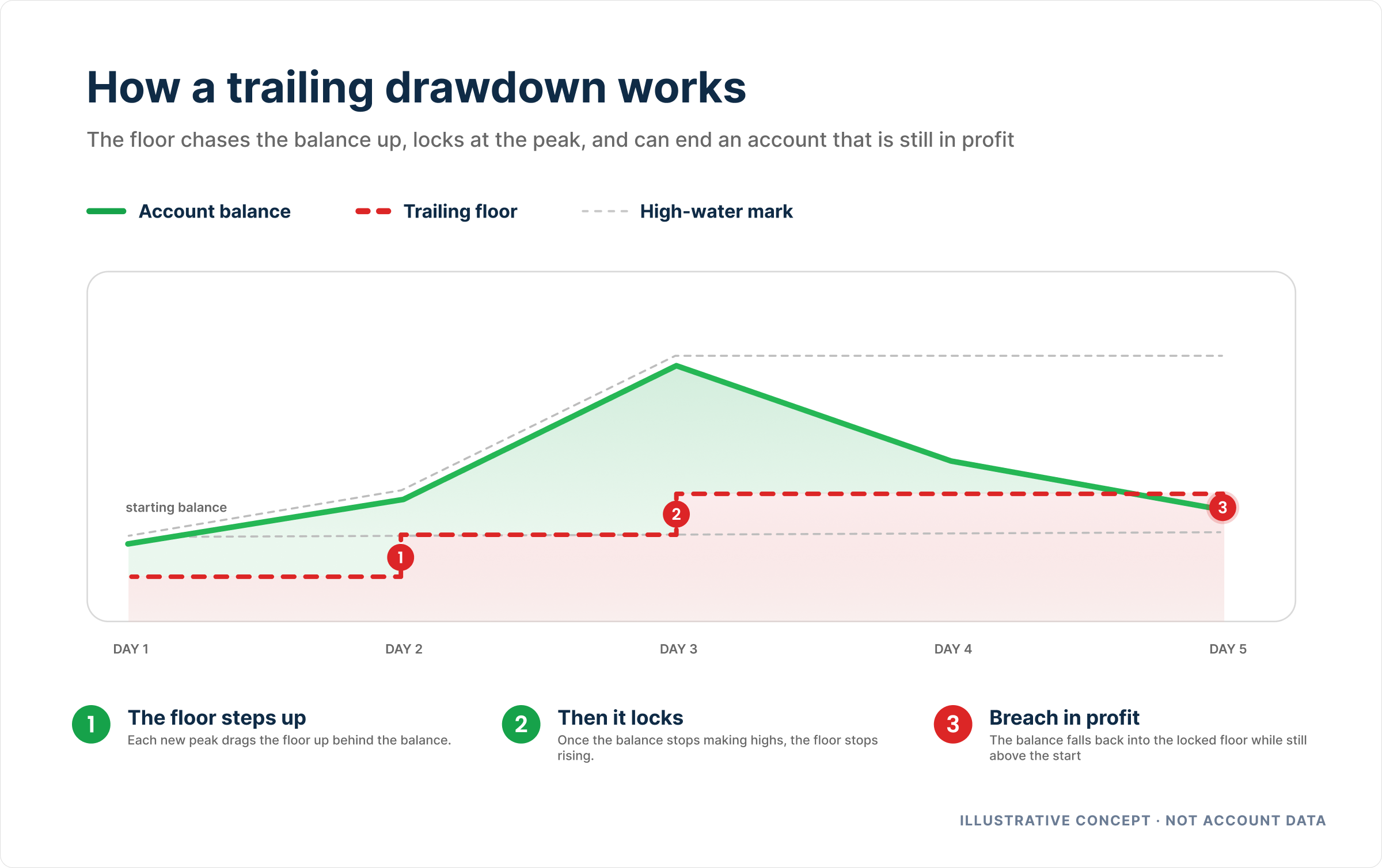
A daily loss limit is separate from the overall drawdown floor, and programs can enforce both simultaneously. FTMO 2-Step applies its 5% daily loss alongside a 10% static maximum loss from initial simulated capital (source: FTMO Trading Objectives). The tool therefore takes a separate overall floor input. For how overall floors move, see drawdown types and the trailing drawdown guide.
Soft pause or account failure
Consequences depend on the exact programme and stage. In Apex's EOD evaluation, a $1,000 daily loss limit brings a soft pause for the session; the intraday evaluation has no DLL. Apex's EOD and intraday performance accounts both apply soft pauses, though exact tier amounts are unverified (EOD performance accounts). MyFundedFutures' Builder 50K carries a $1,000 soft pause in both the evaluation and funded stages, while Rapid 50K has no DLL in either. Topstep's Trading Combine and XFA have no default DLL when none is added at checkout. FTMO's Global 2Step treats the daily loss as a hard breach strictly below the floor. How often each outcome occurs is not documented.
An arithmetic illustration of reset risk
This is an original arithmetic illustration, not an observed trade and not a forecast. Allowance 5,000, opening balance 100,000, closed net P/L +3,000, open net P/L -7,000. Equity is 96,000 against a daily floor of 95,000, leaving 1,000 of headroom. If the same open loss persisted into a session opening at 103,000, the new daily floor would be 98,000 and equity of 96,000 would sit below it. The reset comparison in the tool exists to surface that risk before it happens. Program-level records sit in the futures comparison.
Daily loss limits by program and account stage
This evidence base covers six specific 50K futures programs from four firms, checked on 3 October 2026. It distinguishes evaluation from simulated funded stages and records a source and date for each field. It is not an exhaustive market survey and not an independent live trading or payout experiment. The comparison tables present published attributes and conditional trade-offs; they do not rank reliability, pass rates or earnings.
Source records checked . Selected paths only. Optional add-ons excluded.
Evaluation stage
| Program | Daily loss allowance | Daily-limit outcome | Separate maximum loss |
|---|---|---|---|
| TopstepTrading Combine Standard pricing / XFA Standard / no DLL add-on | Not applicable [29]Optional checkout DLL excluded from this row. | Not applicable [29]No checkout DLL selected. | $2,000.00 [4] |
| Apex Trader FundingEOD Evaluation No Activation Fee / PA / Rithmic | $1,000.00 [8] | Trading pauses for the session [8] | $2,000.00 [8] |
| Apex Trader FundingIntraday Evaluation No Activation Fee / PA / Rithmic | Not applicable [12]Intraday evaluation has no DLL. | Not applicable [12]No DLL in this evaluation. | $2,000.00 [12] |
| MyFundedFuturesBuilder Default / 2000 MLL / current one-time purchase | $1,000.00 [21] | Trading pauses for the session [21] | $2,000.00 [21] |
| MyFundedFuturesRapid Intraday / current one-time purchase | Not applicable [30]No evaluation DLL. | Not applicable [30]No evaluation DLL. | $2,000.00 [30] |
| TradeifySelect Evaluation 40% / Select Flex / new purchase after 1 Sep 2026 | Not applicable [25]No evaluation DLL. | Not applicable [25]No evaluation DLL. | $2,000.00 [25] |
Simulated funded stage
| Program | Daily loss allowance | Daily-limit outcome | Separate maximum loss |
|---|---|---|---|
| TopstepTrading Combine Standard pricing / XFA Standard / no DLL add-on | Not applicable [5]Optional checkout DLL excluded. | Not applicable [5]No checkout DLL selected. | $2,000.00 [4] |
| Apex Trader FundingEOD Evaluation No Activation Fee / PA / Rithmic | Not verified [10]DLL varies with PA scaling tier; exact tier amounts not verified. | Trading pauses for the session [10] | $2,000.00 [10] |
| Apex Trader FundingIntraday Evaluation No Activation Fee / PA / Rithmic | Not verified [14]DLL varies with PA scaling tier; exact tier amounts not verified. | Trading pauses for the session [14] | $2,000.00 [14] |
| MyFundedFuturesBuilder Default / 2000 MLL / current one-time purchase | $1,000.00 [21] | Trading pauses for the session [21] | $2,000.00 [21] |
| MyFundedFuturesRapid Intraday / current one-time purchase | Not applicable [30]No simulated-funded DLL. | Not applicable [30]No simulated-funded DLL. | $2,000.00 [30] |
| TradeifySelect Evaluation 40% / Select Flex / new purchase after 1 Sep 2026 | Not applicable [27]Select Flex has no DLL; Select Daily is a different funded path. | Not applicable [27]No DLL on Select Flex. | $2,000.00 [27] |
Frequently Asked Questions
Does the daily loss tool connect to my account?
No. The tool computes illustrations from the numbers you enter. It does not read live balances, does not check execution restrictions such as news rules, and does not certify payout eligibility. Its outputs are arithmetic, not statements about any real account.
Do all programs enforce a daily loss limit?
No. Among the recorded 50K futures programs, the Apex EOD evaluation applies a 1,000 limit as a soft session pause, the Apex Intraday evaluation has none, MFFU Builder applies 1,000, MFFU Rapid has none, and Topstep's Standard path makes the DLL optional at purchase. Always check the exact program and stage in the futures comparison.
Is hitting the daily limit the same as failing the account?
Not universally. In the Apex EOD evaluation and MFFU Builder the daily limit is a soft pause for the session. In FTMO's Global 2-Step, falling below the daily floor is a breach condition. The consequence belongs to the specific program and stage; the scoped FTMO record is at the FTMO review.